Joysticks – understand the most important functions and types


Joysticks – understand the most important functions and types
Joysticks are now used for much more than classic arcade games. They have become an essential tool for gamers, simulation enthusiasts, and professional users who want precision and control. Whether you are flying a plane in a simulator, playing racing games, or using the joystick for industrial control, there are many models with different features and technologies.
In this article, you’ll get an overview of what you should know before choosing a joystick, the types available, and the factors that can help you find the model that best suits your needs.
The article presents a wide range of joysticks – from simple models to advanced solutions with many features. The aim is to provide an overview of characteristics, areas of use, and price levels so you can more easily assess which type best suits your setup. The product information is based on publicly available descriptions from manufacturers and retailers and is summarised to provide a clear and informative overview.
Factors to consider when buying joysticks
When choosing a joystick, you should consider ergonomics, functionality, and compatibility. Here are some of the most important factors to take into account.
1. Ergonomics and build quality
A good joystick should feel comfortable in your hand – especially if you use it for long periods. Choose a model with solid construction, adjustable resistance, and possibly a hand rest. Materials such as metal and rubber often provide better durability and grip than cheap plastic.
2. Number of axes and buttons
The more axes and buttons, the more control you get. A simple joystick typically has two axes (X and Y), while advanced models can have up to six axes, rotating handles, and many programmable buttons. This is especially relevant for flight simulators and complex games where precision and quick access to functions are crucial.
3. Feedback and feel
Force feedback or haptic feedback provides realistic resistance and vibrations that mimic movements and forces in the game. It increases realism and makes the experience more engaging. If you play simulators, this feature can be a big advantage.
4. Compatibility and connectivity
Most joysticks connect via USB, but wireless models also exist. Make sure the joystick is compatible with your operating system (Windows, macOS, Linux, or console). Some models also support integration with VR equipment or other control devices.
5. Price and area of use
The price depends on features and quality. Simple joysticks are ideal for casual gaming, while professional models with advanced feedback and many buttons are aimed at enthusiasts. Consider how often you will use the joystick and then choose a model that matches your needs.
Products in focus
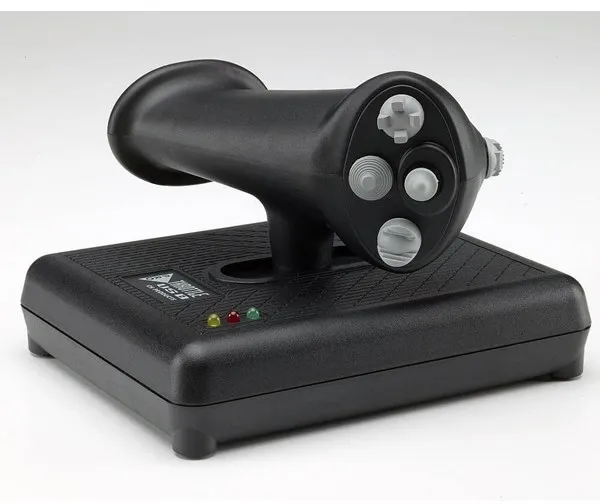
The CH Products Pro Throttle is a left-handed throttle developed for flight simulators on PC. The device features three axes, four buttons, three 4-way hat switches, and one 8-way hat switch, providing extensive control options during flight.
The throttle unit supports up to 176 programmable functions via the included Control Manager software, allowing users to customise controls to their needs. It has three programming modes that can be switched directly on the handle, and coloured LED indicators show which mode is active.
The design is ergonomic and based on the H.O.T.A.S. principle (Hands On Throttle And Stick), providing a realistic and comfortable experience. The solid base with non-slip feet ensures stability during use.
The Pro Throttle connects via USB and requires no drivers for installation. It is compatible with a wide range of Windows versions as well as Mac OS X, making it flexible to use.
- Three axes and 24 buttons: Provides extensive control options in simulators.
- Programmable functionality: Up to 176 functions via Control Manager software.
- Ergonomic design: Left-handed H.O.T.A.S. layout for realistic control.
- LED indicators: Show active mode during use.
- Plug and Play: USB connection without the need for drivers, compatible with both PC and Mac.
Pros and cons
- Many programmable functions and modes
- Ergonomic and solid construction
- Compatible with both Windows and Mac
- Stable base with non-slip feet
- Easy installation via USB
- Primarily designed for left-handed use
- Requires a separate joystick for full flight simulator setup
Pros and cons
Pros
- Many programmable functions and modes
- Ergonomic and solid construction
- Compatible with both Windows and Mac
- Stable base with non-slip feet
- Easy installation via USB
Cons
- Primarily designed for left-handed use
- Requires a separate joystick for full flight simulator setup
Pros
- Many programmable functions and modes
- Ergonomic and solid construction
- Compatible with both Windows and Mac
- Stable base with non-slip feet
- Easy installation via USB
Cons
- Primarily designed for left-handed use
- Requires a separate joystick for full flight simulator setup
Specifications
- Manufacturer: CH Products
- Model: 0040478301223
- EAN: 0040478301223
- Item number: 3133110
- Connection: Wired USB
- Number of axes: 3
- Number of buttons: 24 (up to 176 programmable functions via software)
- Hat switches: Three 4-way and one 8-way
- Modes: Three programming modes with LED indicators
- Compatibility: Windows 98, 2000, XP, Vista, 7, 8 and Mac OS X
- Software: CH Control Manager (version 4.xx)
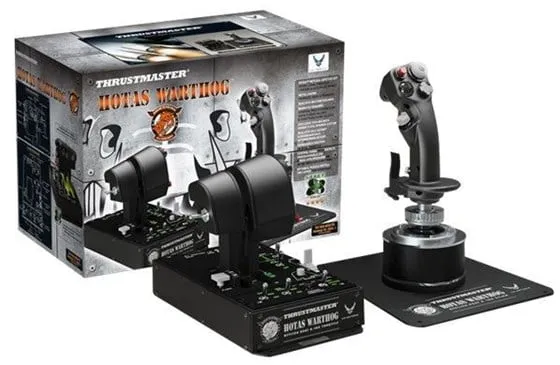
The Thrustmaster HOTAS Warthog is an advanced joystick and throttle system developed for PC users who want an authentic flight simulator experience. The set is a true replica of the control system from the U.S. Air Force A-10C attack aircraft and consists of both a joystick, dual throttle, and control panel.
The unit is wired and connects via USB, ensuring a stable connection and fast response. It uses Thrustmaster's H.E.A.R.T HallEffect AccuRate Technology, which provides precise and consistent control without mechanical wear.
The throttle unit has dual control, allowing two engines to be controlled independently – ideal for advanced flight simulators. The system comes with T.A.R.G.E.T software, which allows advanced programming and customisation of buttons and functions.
With its robust construction, weight of over six kilos, and detailed switches, the HOTAS Warthog is designed for users who prioritise realism and durability in their simulator equipment.
- Authentic design: Replica of the control system from the U.S. Air Force A-10C.
- Precise control: H.E.A.R.T HallEffect AccuRate Technology ensures accurate motion detection.
- Dual throttle: Independent control of two engines for realistic flight control.
- Advanced software: The T.A.R.G.E.T program allows individual customisation of functions.
- Solid construction: Robust metal design weighing 6.44 kg for stability during use.
Pros and cons
- Very realistic and solidly built joystick and throttle system
- High precision thanks to HallEffect sensors
- Option for advanced programming via T.A.R.G.E.T software
- Dual throttle provides flexible control in simulators
- High weight and large physical size require ample desk space
- The price is on the high side compared to simpler controllers
- Wired connection may limit placement and freedom of movement
Pros and cons
Pros
- Very realistic and solidly built joystick and throttle system
- High precision thanks to HallEffect sensors
- Option for advanced programming via T.A.R.G.E.T software
- Dual throttle provides flexible control in simulators
Cons
- High weight and large physical size require ample desk space
- The price is on the high side compared to simpler controllers
- Wired connection may limit placement and freedom of movement
Pros
- Very realistic and solidly built joystick and throttle system
- High precision thanks to HallEffect sensors
- Option for advanced programming via T.A.R.G.E.T software
- Dual throttle provides flexible control in simulators
Cons
- High weight and large physical size require ample desk space
- The price is on the high side compared to simpler controllers
- Wired connection may limit placement and freedom of movement
Specifications
- Manufacturer: Thrustmaster
- Model: 2960720
- EAN: 3362932913771
- Product type: Joystick and throttle
- Connection technology: Wired
- Interface: 2 x USB (4 pin USB Type A)
- Features: Dual throttle control, H.E.A.R.T HallEffect AccuRate Technology
- Includes software: T.A.R.G.E.T (Thrustmaster Advanced pRogramming Graphical EdiTor)
- Designed for: PC
- Width: 32 cm
- Depth: 26 cm
- Height: 44 cm
- Weight: 6.44 kg
- Item number: 2417842
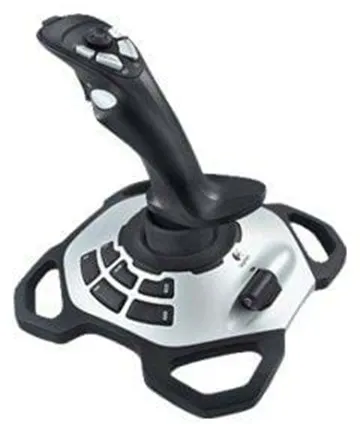
The Logitech Extreme 3D Pro is a wired joystick developed for PC users who want precise and stable control in games. With 12 programmable buttons and an 8-way hat switch, it allows you to customise the controls according to individual preferences.
The joystick is equipped with handle rotation, which makes it possible to control rudders or similar functions with a natural movement. The ergonomic design ensures a good grip, even during longer gaming sessions.
The connection is via USB, providing stable and fast response without the need for batteries or wireless setup. It is compatible with several versions of Windows, including Vista, 7, and 8.
- 12 buttons: Allows extensive customisation of controls.
- 8-way hat switch: Enables precise navigation and camera control.
- Handle rotation: Provides extra control over rudders or similar functions.
- Wired connection: Stable and lag-free control via USB.
- Ergonomic design: Comfortable grip for longer gaming periods.
Pros and cons
- Precise and stable control
- Many programmable buttons
- Ergonomic design
- Easy USB connection without the need for batteries
- Wired connection limits freedom of movement
- Primarily compatible with Windows systems
Pros and cons
Pros
- Precise and stable control
- Many programmable buttons
- Ergonomic design
- Easy USB connection without the need for batteries
Cons
- Wired connection limits freedom of movement
- Primarily compatible with Windows systems
Pros
- Precise and stable control
- Many programmable buttons
- Ergonomic design
- Easy USB connection without the need for batteries
Cons
- Wired connection limits freedom of movement
- Primarily compatible with Windows systems
Specifications
- Manufacturer: Logitech
- Model: 942-000031
- Item number: 2412673
- EAN: 5099206041912
- Product type: Joystick
- Connection technology: Wired (USB)
- Number of buttons: 12
- Control: 8-way hat switch, triggers
- Features: Handle rotation
- Designed for: PC
- Compatible operating systems: Microsoft Windows Vista / 7 / 8
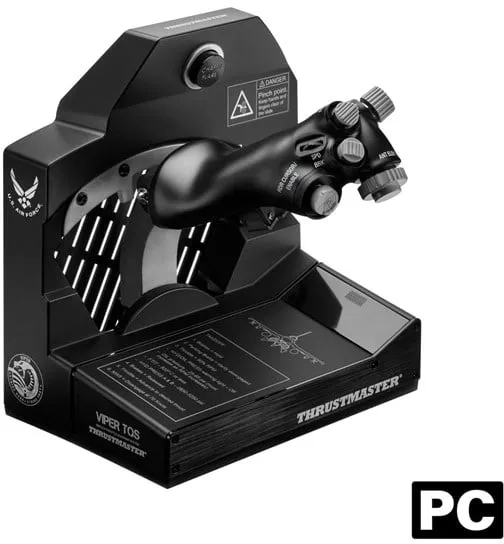
The Thrustmaster Viper TQS is a throttle quadrant system designed for PC that replicates the throttle from the modern Viper fighter jet at full scale. The unit is officially licensed by the US Air Force and constructed in metal to provide a realistic feel and durability.
The system features 21 action buttons, including 2 virtual ones, as well as 5 axes and detents, providing extensive control options in flight simulators. The magnetic H.E.A.R.T sensor (HallEffect AccuRate Technology) ensures high precision with 16-bit resolution and 65,635 values.
The throttle has adjustable friction for firm and linear movement without dead zones. It includes realistic controls such as the CHAFF/FLARE slap switch, used to activate countermeasures in aerial combat.
The Viper TQS provides access to Idle/Cutoff and Afterburner detents via mechanical levers and grip rotation. The lower part can be detached to fit with the separately sold Viper Panel, which expands functionality with more buttons and an additional axis.
The unit connects via USB and is Plug and Play compatible with DCS World, where it is automatically recognised without setup. It also supports Thrustmaster's T.A.R.G.E.T software, allowing users to create and save custom profiles.
- 1:1 metal replica: Replicates the Viper fighter jet's throttle quadrant at full scale.
- High precision: 16-bit H.E.A.R.T sensor with 65,635 values for accurate control.
- Extensive control: 21 buttons, 5 axes, and detents.
- Realistic movement: Adjustable friction and mechanical detents for an authentic feel.
- Plug and Play: Compatible with DCS World without setup.
- Expansion option: Can be combined with the Viper Panel (sold separately).
Pros and cons
- Realistic metal construction with authentic feel
- High precision with magnetic sensor
- Extensive control options with many buttons and axes
- Compatible with DCS World and T.A.R.G.E.T software
- Expandable with the Viper Panel
- Requires desk space due to its size
- Viper Panel must be purchased separately for full functionality
- Primarily aimed at advanced users and flight simulation enthusiasts
Pros and cons
Pros
- Realistic metal construction with authentic feel
- High precision with magnetic sensor
- Extensive control options with many buttons and axes
- Compatible with DCS World and T.A.R.G.E.T software
- Expandable with the Viper Panel
Cons
- Requires desk space due to its size
- Viper Panel must be purchased separately for full functionality
- Primarily aimed at advanced users and flight simulation enthusiasts
Pros
- Realistic metal construction with authentic feel
- High precision with magnetic sensor
- Extensive control options with many buttons and axes
- Compatible with DCS World and T.A.R.G.E.T software
- Expandable with the Viper Panel
Cons
- Requires desk space due to its size
- Viper Panel must be purchased separately for full functionality
- Primarily aimed at advanced users and flight simulation enthusiasts
Specifications
- Manufacturer: Thrustmaster
- Model: 4060252
- Item number: 3202870
- EAN: 3362934003272
- Product type: Throttle (Throttle Quadrant System)
- Connection technology: Wired (USB)
- Number of buttons: 19 (hardware) / 21 (incl. virtual)
- Number of axes: 5
- Interface: USB
- Equipment included: USB-C cable
- Width: 9.3 cm
- Depth: 29.6 cm
- Height: 8.2 cm
- Weight: 928 g
- Compatibility: PC
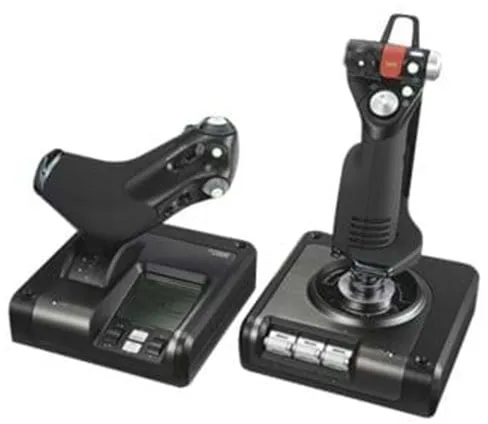
The Logitech G Saitek X52 Professional H.O.T.A.S. is an integrated control system for flight and space games, consisting of a joystick and a separate throttle unit. The system is designed to provide a realistic and precise control experience for both experienced and new simulator pilots.
The joystick is equipped with a dual spring centring system that ensures smooth movement and precise control. It also features rudder control via handle rotation and an adjustable grip so it can be adapted to different hand sizes.
The throttle unit has a built-in LCD screen that displays game-related data in real time, and the backlighting makes it easy to use the controller in dark environments. The sensitivity can be adjusted so the user can fine-tune the control as needed.
The system connects via USB and is compatible with Windows 7, 8.1, and 10. The combination of joystick and throttle provides an authentic experience that makes it easier to perform complex manoeuvres in simulators.
- Complete H.O.T.A.S. system: Includes both joystick and throttle for realistic control.
- Precise control: Dual spring centring mechanism provides smooth movement.
- Ergonomic design: Adjustable handle adapted to different users.
- LCD display: Shows game information in real time.
- Backlighting: Makes it easy to use the controller in dark environments.
Pros and cons
- Realistic control with separate joystick and throttle
- Adjustable handle for better ergonomics
- LCD screen with real-time data
- Backlighting for use in the dark
- Solid construction and precise control
- Requires desk space for both units
- Wired connection may limit freedom of movement
Pros and cons
Pros
- Realistic control with separate joystick and throttle
- Adjustable handle for better ergonomics
- LCD screen with real-time data
- Backlighting for use in the dark
- Solid construction and precise control
Cons
- Requires desk space for both units
- Wired connection may limit freedom of movement
Pros
- Realistic control with separate joystick and throttle
- Adjustable handle for better ergonomics
- LCD screen with real-time data
- Backlighting for use in the dark
- Solid construction and precise control
Cons
- Requires desk space for both units
- Wired connection may limit freedom of movement
Specifications
- Manufacturer: Logitech
- Model: 945-000003
- EAN: 5099206069893
- Product type: Joystick and throttle
- Connection technology: Wired
- Interface: USB
- Joystick features: Rudder control, twist axis, handle adjustment system
- Throttle features: LCD screen, backlighting, sensitivity adjustment
- Compatibility: PC
- Supported operating systems: Microsoft Windows 7 / 8.1 / 10
Product descriptions
The CH Products Pro Throttle is a left-handed throttle developed for flight simulators on PC. The device features three axes, four buttons, three 4-way hat switches, and one 8-way hat switch, providing extensive control options during flight.
The throttle unit supports up to 176 programmable functions via the included Control Manager software, allowing users to customise controls to their needs. It has three programming modes that can be switched directly on the handle, and coloured LED indicators show which mode is active.
The design is ergonomic and based on the H.O.T.A.S. principle (Hands On Throttle And Stick), providing a realistic and comfortable experience. The solid base with non-slip feet ensures stability during use.
The Pro Throttle connects via USB and requires no drivers for installation. It is compatible with a wide range of Windows versions as well as Mac OS X, making it flexible to use.
- Three axes and 24 buttons: Provides extensive control options in simulators.
- Programmable functionality: Up to 176 functions via Control Manager software.
- Ergonomic design: Left-handed H.O.T.A.S. layout for realistic control.
- LED indicators: Show active mode during use.
- Plug and Play: USB connection without the need for drivers, compatible with both PC and Mac.
Pros and cons
- Many programmable functions and modes
- Ergonomic and solid construction
- Compatible with both Windows and Mac
- Stable base with non-slip feet
- Easy installation via USB
- Primarily designed for left-handed use
- Requires a separate joystick for full flight simulator setup
Pros and cons
Pros
- Many programmable functions and modes
- Ergonomic and solid construction
- Compatible with both Windows and Mac
- Stable base with non-slip feet
- Easy installation via USB
Cons
- Primarily designed for left-handed use
- Requires a separate joystick for full flight simulator setup
Pros
- Many programmable functions and modes
- Ergonomic and solid construction
- Compatible with both Windows and Mac
- Stable base with non-slip feet
- Easy installation via USB
Cons
- Primarily designed for left-handed use
- Requires a separate joystick for full flight simulator setup
Specifications
- Manufacturer: CH Products
- Model: 0040478301223
- EAN: 0040478301223
- Item number: 3133110
- Connection: Wired USB
- Number of axes: 3
- Number of buttons: 24 (up to 176 programmable functions via software)
- Hat switches: Three 4-way and one 8-way
- Modes: Three programming modes with LED indicators
- Compatibility: Windows 98, 2000, XP, Vista, 7, 8 and Mac OS X
- Software: CH Control Manager (version 4.xx)
The Thrustmaster HOTAS Warthog is an advanced joystick and throttle system developed for PC users who want an authentic flight simulator experience. The set is a true replica of the control system from the U.S. Air Force A-10C attack aircraft and consists of both a joystick, dual throttle, and control panel.
The unit is wired and connects via USB, ensuring a stable connection and fast response. It uses Thrustmaster's H.E.A.R.T HallEffect AccuRate Technology, which provides precise and consistent control without mechanical wear.
The throttle unit has dual control, allowing two engines to be controlled independently – ideal for advanced flight simulators. The system comes with T.A.R.G.E.T software, which allows advanced programming and customisation of buttons and functions.
With its robust construction, weight of over six kilos, and detailed switches, the HOTAS Warthog is designed for users who prioritise realism and durability in their simulator equipment.
- Authentic design: Replica of the control system from the U.S. Air Force A-10C.
- Precise control: H.E.A.R.T HallEffect AccuRate Technology ensures accurate motion detection.
- Dual throttle: Independent control of two engines for realistic flight control.
- Advanced software: The T.A.R.G.E.T program allows individual customisation of functions.
- Solid construction: Robust metal design weighing 6.44 kg for stability during use.
Pros and cons
- Very realistic and solidly built joystick and throttle system
- High precision thanks to HallEffect sensors
- Option for advanced programming via T.A.R.G.E.T software
- Dual throttle provides flexible control in simulators
- High weight and large physical size require ample desk space
- The price is on the high side compared to simpler controllers
- Wired connection may limit placement and freedom of movement
Pros and cons
Pros
- Very realistic and solidly built joystick and throttle system
- High precision thanks to HallEffect sensors
- Option for advanced programming via T.A.R.G.E.T software
- Dual throttle provides flexible control in simulators
Cons
- High weight and large physical size require ample desk space
- The price is on the high side compared to simpler controllers
- Wired connection may limit placement and freedom of movement
Pros
- Very realistic and solidly built joystick and throttle system
- High precision thanks to HallEffect sensors
- Option for advanced programming via T.A.R.G.E.T software
- Dual throttle provides flexible control in simulators
Cons
- High weight and large physical size require ample desk space
- The price is on the high side compared to simpler controllers
- Wired connection may limit placement and freedom of movement
Specifications
- Manufacturer: Thrustmaster
- Model: 2960720
- EAN: 3362932913771
- Product type: Joystick and throttle
- Connection technology: Wired
- Interface: 2 x USB (4 pin USB Type A)
- Features: Dual throttle control, H.E.A.R.T HallEffect AccuRate Technology
- Includes software: T.A.R.G.E.T (Thrustmaster Advanced pRogramming Graphical EdiTor)
- Designed for: PC
- Width: 32 cm
- Depth: 26 cm
- Height: 44 cm
- Weight: 6.44 kg
- Item number: 2417842
The Logitech Extreme 3D Pro is a wired joystick developed for PC users who want precise and stable control in games. With 12 programmable buttons and an 8-way hat switch, it allows you to customise the controls according to individual preferences.
The joystick is equipped with handle rotation, which makes it possible to control rudders or similar functions with a natural movement. The ergonomic design ensures a good grip, even during longer gaming sessions.
The connection is via USB, providing stable and fast response without the need for batteries or wireless setup. It is compatible with several versions of Windows, including Vista, 7, and 8.
- 12 buttons: Allows extensive customisation of controls.
- 8-way hat switch: Enables precise navigation and camera control.
- Handle rotation: Provides extra control over rudders or similar functions.
- Wired connection: Stable and lag-free control via USB.
- Ergonomic design: Comfortable grip for longer gaming periods.
Pros and cons
- Precise and stable control
- Many programmable buttons
- Ergonomic design
- Easy USB connection without the need for batteries
- Wired connection limits freedom of movement
- Primarily compatible with Windows systems
Pros and cons
Pros
- Precise and stable control
- Many programmable buttons
- Ergonomic design
- Easy USB connection without the need for batteries
Cons
- Wired connection limits freedom of movement
- Primarily compatible with Windows systems
Pros
- Precise and stable control
- Many programmable buttons
- Ergonomic design
- Easy USB connection without the need for batteries
Cons
- Wired connection limits freedom of movement
- Primarily compatible with Windows systems
Specifications
- Manufacturer: Logitech
- Model: 942-000031
- Item number: 2412673
- EAN: 5099206041912
- Product type: Joystick
- Connection technology: Wired (USB)
- Number of buttons: 12
- Control: 8-way hat switch, triggers
- Features: Handle rotation
- Designed for: PC
- Compatible operating systems: Microsoft Windows Vista / 7 / 8
The Thrustmaster Viper TQS is a throttle quadrant system designed for PC that replicates the throttle from the modern Viper fighter jet at full scale. The unit is officially licensed by the US Air Force and constructed in metal to provide a realistic feel and durability.
The system features 21 action buttons, including 2 virtual ones, as well as 5 axes and detents, providing extensive control options in flight simulators. The magnetic H.E.A.R.T sensor (HallEffect AccuRate Technology) ensures high precision with 16-bit resolution and 65,635 values.
The throttle has adjustable friction for firm and linear movement without dead zones. It includes realistic controls such as the CHAFF/FLARE slap switch, used to activate countermeasures in aerial combat.
The Viper TQS provides access to Idle/Cutoff and Afterburner detents via mechanical levers and grip rotation. The lower part can be detached to fit with the separately sold Viper Panel, which expands functionality with more buttons and an additional axis.
The unit connects via USB and is Plug and Play compatible with DCS World, where it is automatically recognised without setup. It also supports Thrustmaster's T.A.R.G.E.T software, allowing users to create and save custom profiles.
- 1:1 metal replica: Replicates the Viper fighter jet's throttle quadrant at full scale.
- High precision: 16-bit H.E.A.R.T sensor with 65,635 values for accurate control.
- Extensive control: 21 buttons, 5 axes, and detents.
- Realistic movement: Adjustable friction and mechanical detents for an authentic feel.
- Plug and Play: Compatible with DCS World without setup.
- Expansion option: Can be combined with the Viper Panel (sold separately).
Pros and cons
- Realistic metal construction with authentic feel
- High precision with magnetic sensor
- Extensive control options with many buttons and axes
- Compatible with DCS World and T.A.R.G.E.T software
- Expandable with the Viper Panel
- Requires desk space due to its size
- Viper Panel must be purchased separately for full functionality
- Primarily aimed at advanced users and flight simulation enthusiasts
Pros and cons
Pros
- Realistic metal construction with authentic feel
- High precision with magnetic sensor
- Extensive control options with many buttons and axes
- Compatible with DCS World and T.A.R.G.E.T software
- Expandable with the Viper Panel
Cons
- Requires desk space due to its size
- Viper Panel must be purchased separately for full functionality
- Primarily aimed at advanced users and flight simulation enthusiasts
Pros
- Realistic metal construction with authentic feel
- High precision with magnetic sensor
- Extensive control options with many buttons and axes
- Compatible with DCS World and T.A.R.G.E.T software
- Expandable with the Viper Panel
Cons
- Requires desk space due to its size
- Viper Panel must be purchased separately for full functionality
- Primarily aimed at advanced users and flight simulation enthusiasts
Specifications
- Manufacturer: Thrustmaster
- Model: 4060252
- Item number: 3202870
- EAN: 3362934003272
- Product type: Throttle (Throttle Quadrant System)
- Connection technology: Wired (USB)
- Number of buttons: 19 (hardware) / 21 (incl. virtual)
- Number of axes: 5
- Interface: USB
- Equipment included: USB-C cable
- Width: 9.3 cm
- Depth: 29.6 cm
- Height: 8.2 cm
- Weight: 928 g
- Compatibility: PC
The Logitech G Saitek X52 Professional H.O.T.A.S. is an integrated control system for flight and space games, consisting of a joystick and a separate throttle unit. The system is designed to provide a realistic and precise control experience for both experienced and new simulator pilots.
The joystick is equipped with a dual spring centring system that ensures smooth movement and precise control. It also features rudder control via handle rotation and an adjustable grip so it can be adapted to different hand sizes.
The throttle unit has a built-in LCD screen that displays game-related data in real time, and the backlighting makes it easy to use the controller in dark environments. The sensitivity can be adjusted so the user can fine-tune the control as needed.
The system connects via USB and is compatible with Windows 7, 8.1, and 10. The combination of joystick and throttle provides an authentic experience that makes it easier to perform complex manoeuvres in simulators.
- Complete H.O.T.A.S. system: Includes both joystick and throttle for realistic control.
- Precise control: Dual spring centring mechanism provides smooth movement.
- Ergonomic design: Adjustable handle adapted to different users.
- LCD display: Shows game information in real time.
- Backlighting: Makes it easy to use the controller in dark environments.
Pros and cons
- Realistic control with separate joystick and throttle
- Adjustable handle for better ergonomics
- LCD screen with real-time data
- Backlighting for use in the dark
- Solid construction and precise control
- Requires desk space for both units
- Wired connection may limit freedom of movement
Pros and cons
Pros
- Realistic control with separate joystick and throttle
- Adjustable handle for better ergonomics
- LCD screen with real-time data
- Backlighting for use in the dark
- Solid construction and precise control
Cons
- Requires desk space for both units
- Wired connection may limit freedom of movement
Pros
- Realistic control with separate joystick and throttle
- Adjustable handle for better ergonomics
- LCD screen with real-time data
- Backlighting for use in the dark
- Solid construction and precise control
Cons
- Requires desk space for both units
- Wired connection may limit freedom of movement
Specifications
- Manufacturer: Logitech
- Model: 945-000003
- EAN: 5099206069893
- Product type: Joystick and throttle
- Connection technology: Wired
- Interface: USB
- Joystick features: Rudder control, twist axis, handle adjustment system
- Throttle features: LCD screen, backlighting, sensitivity adjustment
- Compatibility: PC
- Supported operating systems: Microsoft Windows 7 / 8.1 / 10
Other products
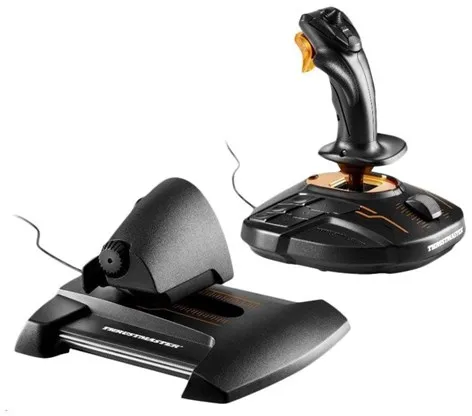
The Thrustmaster T.16000M FCS Hotas is a complete control set consisting of a joystick and throttle, designed for PC users who want realistic and precise control in flight and space games. The system uses H.E.A.R.T HallEffect AccuRate Technology, which employs magnetic sensors to detect movements with high accuracy and without mechanical friction.
The joystick has an ambidextrous design, meaning it can be used by both right- and left-handed players. The ergonomic shape and weighted base provide stability and comfort during long gaming sessions.
The included TWCS throttle provides extra control over speed and manoeuvring. Together, the two units offer a wide range of buttons and axes, allowing the user to customise control for complex flight manoeuvres without the need for a keyboard or mouse.
The set is compatible with Windows Vista, 7, 8, and 10 (32/64-bit) and connects via USB. It is suitable for both beginners and experienced pilots who want a balanced combination of precision and ease of use.
- High-precision control: Magnetic H.E.A.R.T sensors ensure smooth and accurate movements.
- Ambidextrous design: Can be adapted for both right- and left-handed users.
- Extensive control options: 16 buttons, 8-way POV hat, and 4 independent axes.
- Ergonomic construction: Comfortable hand rest and stable base for long sessions.
- Complete HOTAS setup: Joystick and TWCS throttle provide a realistic flight experience.
Pros and cons
- Very precise control thanks to magnetic sensors
- Can be used by both right- and left-handed users
- Many programmable buttons and axes
- Ergonomic and stable construction
- Suitable for both flight and space games
- Requires USB connection and in-game support
- Can take up quite a bit of desk space
- No wireless functionality
Pros and cons
Pros
- Very precise control thanks to magnetic sensors
- Can be used by both right- and left-handed users
- Many programmable buttons and axes
- Ergonomic and stable construction
- Suitable for both flight and space games
Cons
- Requires USB connection and in-game support
- Can take up quite a bit of desk space
- No wireless functionality
Pros
- Very precise control thanks to magnetic sensors
- Can be used by both right- and left-handed users
- Many programmable buttons and axes
- Ergonomic and stable construction
- Suitable for both flight and space games
Cons
- Requires USB connection and in-game support
- Can take up quite a bit of desk space
- No wireless functionality
Specifications
- Manufacturer: Thrustmaster
- Model: 2960778
- Item number: 2579623
- EAN: 3362932914846
- Product type: Joystick and throttle (HOTAS set)
- Connection technology: Wired (USB)
- Number of buttons: 16
- Control: Trigger
- Features: H.E.A.R.T HallEffect AccuRate Technology, magnetic sensor, S.M.A.R.T technology
- Designed for: PC
- Compatible operating systems: Windows Vista / 7 / 8 / 10 (32/64-bit)
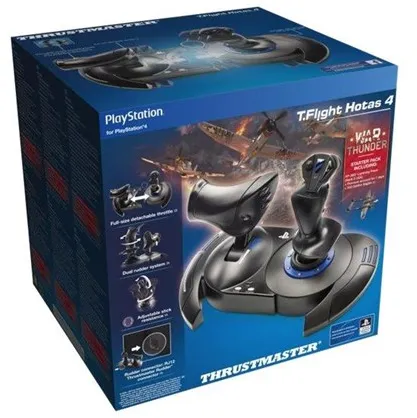
The Thrustmaster T-Flight Hotas 4 is an officially licensed joystick for PlayStation 4 and PlayStation 5, which also works with PC. It is designed to provide a realistic flying experience with an ergonomic grip, large hand rest and a quick trigger that is easy to reach during gameplay.
The full-size throttle can be detached, providing flexibility in setup and making it easier to adapt the controls to different types of flying – including in virtual reality. The dual rudder control can be operated either by rotating the handle or via a rocker, depending on the user's preference.
The joystick has adjustable resistance, so it can be customised to individual needs, and a weighted base that ensures stability during use. An internal memory stores the latest programming, even when the device is disconnected.
The T-Flight Hotas 4 is plug-and-play, meaning it can be quickly put into use without complicated setup. It is equipped with dedicated PlayStation buttons (PS, Share and Options), so it integrates naturally into the console's control system.
- Official PlayStation licence: Compatible with PS4, PS5 and PC.
- Detachable throttle: Provides flexible setup and realistic control.
- Adjustable resistance: Customise the control to personal preferences.
- Ergonomic design: Large hand rest and weighted base for stability.
- Dual rudder system: Operated via handle rotation or rocker.
Pros and cons
- Realistic flying experience with joystick and throttle
- Compatible with both PlayStation and PC
- Detachable throttle for flexible setup
- Adjustable resistance and stable base
- Plug-and-play installation
- Requires wired connection (not wireless)
- Can take up quite a bit of space on the desk
Pros and cons
Pros
- Realistic flying experience with joystick and throttle
- Compatible with both PlayStation and PC
- Detachable throttle for flexible setup
- Adjustable resistance and stable base
- Plug-and-play installation
Cons
- Requires wired connection (not wireless)
- Can take up quite a bit of space on the desk
Pros
- Realistic flying experience with joystick and throttle
- Compatible with both PlayStation and PC
- Detachable throttle for flexible setup
- Adjustable resistance and stable base
- Plug-and-play installation
Cons
- Requires wired connection (not wireless)
- Can take up quite a bit of space on the desk
Specifications
- Manufacturer: Thrustmaster
- Model: 4160664
- Item number: 2538756
- EAN: 3362934110208
- Product type: Joystick and throttle
- Connection technology: Wired
- Designed for: PC, Sony PlayStation 4, Sony PlayStation 5
- Control: Action buttons, trigger
- Features (joystick): Adjustable tension, rudder control, ergonomic design, locking system
- Features (throttle): Detachable throttle
- Included equipment: Allen key
Different types of joysticks
Joysticks come in many variants, each designed for different purposes and user types.
1. Standard joysticks
These models are simple and suitable for general gaming. They typically have two axes and few buttons and are often used for arcade games or as an introduction to joystick control. They are affordable and easy to install.
2. Flight simulator joysticks
Flight simulator joysticks (flight sticks) are designed to mimic cockpit controls. They often have throttle units, many buttons, and realistic resistance. Some sets also include pedals for full control of the aircraft’s movements.
3. Racing and control sticks
These joysticks are primarily used for car and space games where precise control is important. They can be combined with a steering wheel or pedals and allow detailed control of acceleration and direction.
4. Industrial joysticks
Outside of gaming, joysticks are used in machine control, robotics, and construction. They are designed for precision and durability and can often be customised for specific functions. This type is typically more expensive and more robust than consumer-oriented models.
5. Specialised joysticks
Some joysticks are developed for VR or accessibility, where they are adapted for users with special needs. They may have alternative layouts, wireless control, or sensors that detect movement without physical contact.
Different brands of joysticks
The joystick market includes many manufacturers, each with their own focus and strengths.
Logitech
Logitech offers joysticks in several price ranges and is known for reliable quality and good ergonomics. Their models are popular among both beginners and experienced users, especially in flight simulators.
Thrustmaster
Thrustmaster is one of the most recognised brands in gaming joysticks. They offer everything from simple models to advanced HOTAS systems (Hands On Throttle And Stick) with realistic feedback and many customisation options.
Hori
Hori produces affordable joysticks focused on console gaming and arcade experiences. They are known for solid build quality and intuitive layouts, making them popular among casual gamers.
VKB and Virpil
These brands cater to enthusiasts and professional simulator users. They offer high precision, metal construction, and modular options so users can customise their setup as needed.
CH Products
CH Products has produced joysticks for both gaming and industry for many years. Their models are known for robustness and long lifespan and are often used in professional environments.
Frequently asked questions
What is a joystick used for?
A joystick is used to control movements in games, simulators, or machines. It provides more precise control than a keyboard or controller, especially in flight and space games.
Are joysticks only for gaming?
No, joysticks are also used in professional contexts such as robot control, cranes, and medical equipment. They are used where precise and intuitive control is necessary.
What does HOTAS mean?
HOTAS stands for Hands On Throttle And Stick and describes a system with both a joystick and a throttle. It is typically used in flight simulators to provide a realistic cockpit experience.
How do you maintain a joystick?
Clean it regularly with a dry cloth and avoid spilling liquids on it. Make sure cables and connectors are not bent or damaged. Update any drivers to ensure optimal performance.
Which joystick should I choose as a beginner?
As a beginner, you can start with a simple model with two axes and few buttons. As you gain more experience, you can upgrade to a model with more features and feedback.
Læs også: